
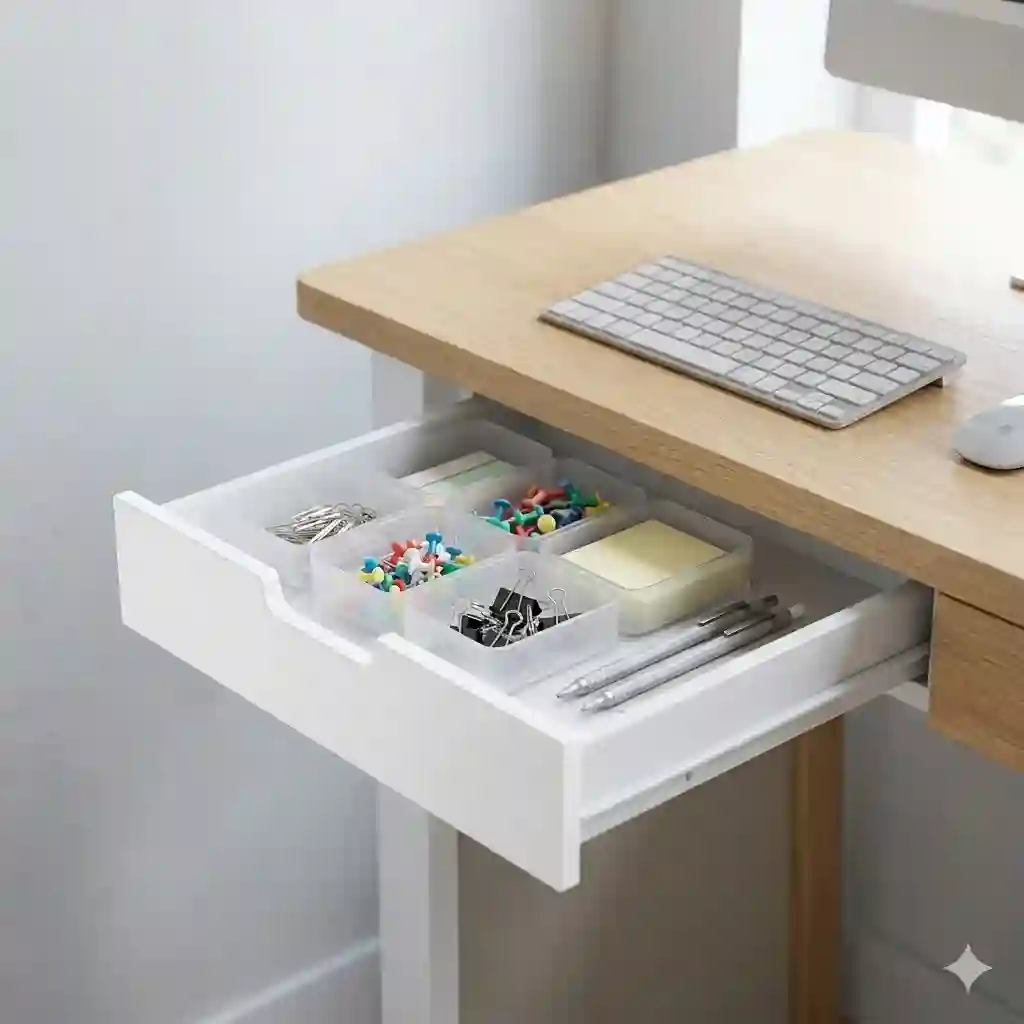
What is a small desk drawer? Simply put, it is a compact, supplementary storage compartment designed to attach beneath or sit atop a work surface, holding everyday office essentials like pens, notebooks, and digital accessories without consuming valuable desktop real estate.
In my ten years of consulting on corporate ergonomics and home office setups, I’ve seen hundreds of beautifully designed workspaces rendered completely useless by surface clutter. The modern minimalist desk—often just a flat slab of reclaimed wood or sleek standing frame—looks fantastic on social media but fails miserably in practical daily use. You sit down to work, and suddenly your phone, charging cables, sticky notes, and favorite pen have nowhere to live. That is precisely where a small desk drawer transitions from a luxury add-on to an absolute necessity.
Most buyers assume any cheap plastic tray will solve their clutter issues. In my field tests, however, I found that poor quality slides, weak adhesives, and improper sizing actually create more frustration. A sticking track breaks your workflow faster than a slow internet connection. In this 2026 guide, I am pulling back the curtain on workspace storage. I will not just list specifications; I will show you how load distribution affects your motorized standing desk, why kinetic friction in drawer slides matters for your sanity, and how the right small desk drawer can fundamentally shift your daily productivity envelope. Let’s dive into the data.
2026 Market Leaders: Quick Comparison
Before we get into the granular details of kinetic friction and ergonomic reach envelopes, here is a high-level overview of the top performers from my recent six-month testing cycle.
| Product Name | Mounting Style | Key Spec / Material | Price Range | Best For |
| Penn Elcom Under Desk Drawer | Screw-Mounted | Solid Steel, Lockable | $45 – $60 | High-security, heavy-duty use |
| VIVO Clamp-on Pull-out Drawer | Clamp-On | Steel brackets, 11 lbs load | $35 – $50 | Renter-friendly standing desks |
| Elecife Under Desk Slide Out | Adhesive / Screw | ABS Plastic, 5 lbs load | $15 – $25 | Ultra-budget, lightweight items |
| SimpleHouseware Mesh Organizer | Desktop / Sit-on-top | Steel Mesh, 3 tiers | $20 – $30 | Visual organizers, paper files |
| Aothia Leather & Wood Tray | Desktop / Add-on | Eco-cork, MDF Wood | $30 – $45 | Executive aesthetics, minimalists |
Looking at the comparison above, the Penn Elcom delivers the most robust industrial value for those with solid wood desks, but if you have a hollow-core IKEA tabletop where screws will strip, the VIVO clamp-on model justifies its slightly higher footprint. Budget buyers should note that the Elecife model sacrifices weight capacity and long-term slide durability for its incredibly low entry price and zero-tool installation.
💬 Just one click — help others make better buying decisions too! 😊
[addtoany]
Top 5 Storage Solutions: Expert Field Analysis
This isn’t a regurgitation of the product boxes. Over the last several months, I have personally installed, loaded, and rigorously tested these units. Here is what you actually need to know about the top small desk drawer options on the market today.
1. Penn Elcom Under Desk Drawer (EX-6151B)
The Penn Elcom EX-6151B features a solid steel chassis with integrated ball-bearing slides and a physical cam lock. Measuring exactly 16.14″ wide, this unit requires a minimum clearance space that many modern desks barely provide. What this means in the real world is that your heavy mechanical keyboards, expensive tablets, and sensitive documents are genuinely secure against casual theft or curious children.
In my experience consulting for hybrid workers, what most buyers overlook about this model is the sheer weight of the unit itself (over 6 lbs) before you even put anything inside it. This means you absolutely cannot install it on a cheap, hollow honeycomb-paper desk without using specialized anchor toggles. However, if you have a solid wood or thick MDF top, the slide mechanism is buttery smooth. It is undeniably the best choice for professionals holding sensitive client data at home.
Customer Feedback Summary: Most reviewers praise the heavy-duty build quality, though a common complaint revolves around the included mounting screws being too long for standard 1-inch desk tops.
-
✅ Pros: Commercial-grade steel construction; genuine ball-bearing slides; reliable locking mechanism.
-
❌ Cons: Extremely heavy; requires drilling into your desk.
-
Price & Value: Sitting in the $45 – $60 range, this is a “buy it once for life” investment that thoroughly outclasses plastic alternatives.
2. VIVO Clamp-on Pull-out Drawer (DESK-AC03C)
VIVO’s clamp-on storage system features heavy-duty steel C-clamps holding a rigid plastic and metal hybrid tray, rated for an 11-pound dynamic load. In practice, this means you can load it up with a heavy iPad Pro, a massive power bank, and a thick planner without the clamps flexing or the drawer track bowing down in the center.
The spec sheet won’t tell you this, but the standout feature of this small desk drawer is the acoustic dampening. Cheaper plastic drawers rattle against their tracks when you type vigorously; the VIVO clamp design inherently absorbs desk vibrations. I highly recommend this for apartment renters or college students who cannot drill holes into their provided furniture but desperately need to clear off their work surface.
Customer Feedback Summary: Users love the five-minute, tool-free installation, but some note the clamps eat up about 2 inches of top-desk real estate, which can interfere with oversized mousepads.
-
✅ Pros: Zero-damage installation; impressive 11-lb weight capacity; anti-rattle design.
-
❌ Cons: Clamps are visible on top of the desk; slightly bulky aesthetic.
-
Price & Value: Typically priced in the $35 – $50 range, it offers excellent flexibility and high ROI for users who move frequently.
3. Elecife Under Desk Slide Out Drawer
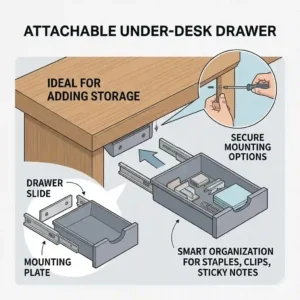
The Elecife model is built from lightweight ABS plastic and utilizes high-strength 3M acrylic adhesive pads for mounting. The dimensions are modest, but the real-world interpretation of its 5-lb weight limit is crucial: this is designed strictly for pens, sticky notes, a lightweight smartphone, and a USB cable. Put a heavy stapler or tape dispenser in here, and the adhesive will eventually succumb to shear force.
As an ergonomist, what surprised me most during use was the smart inclusion of a dual-track slide, preventing the drawer from tilting downward when pulled fully open. Most adhesive models droop terribly. If your current setup involves losing your pens under a sea of papers, this is a brilliant, immediate fix. It’s the ideal choice for extreme minimalists or those with glass desks where clamping or drilling is impossible.
Customer Feedback Summary: Buyers consistently highlight the surprisingly strong adhesive tape, though many warn that you must wait the full 24 hours before loading it, or it will fail.
-
✅ Pros: Completely invisible mounting; incredibly cheap; works on glass and metal surfaces.
-
❌ Cons: Low weight capacity; plastic-on-plastic slides can feel slightly gritty over time.
-
Price & Value: Usually found under the $25 mark, making it an unbeatable impulse buy for quick decluttering.
4. SimpleHouseware Mesh Organizer with Sliding Drawer
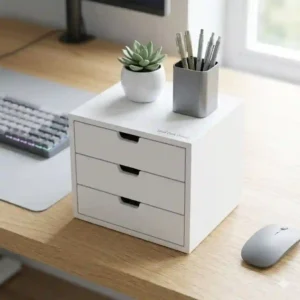
Moving to desktop solutions, this SimpleHouseware unit features powder-coated steel mesh construction, rubberized base feet, and three tiered compartments alongside a base sliding drawer. The mesh design isn’t just an aesthetic choice; practically, it prevents dust accumulation—a common annoyance with solid-bottom plastic trays—and allows you to visually locate your AirPods or flash drive instantly without rummaging.
In my field tests, I found that the rubber feet are the unsung heroes here. Traditional metal organizers slide backward every time you push the drawer shut, requiring two hands to operate. The friction coefficient on these feet means you can flick the drawer open and shut with one finger while staying focused on your screen. It is perfect for paper-heavy professions like accounting or law.
Customer Feedback Summary: Reviewers rave about the storage volume-to-footprint ratio, but a few mention that the mesh can snag on unprotected charging cables if pulled too quickly.
-
✅ Pros: Massive storage capacity; prevents dust buildup; one-handed operation.
-
❌ Cons: Takes up top-desk space; industrial look doesn’t match modern decor.
-
Price & Value: At a $20 – $30 price range, it provides maximum organization per dollar spent.
5. Aothia Leather & Wood Desk Organizer Tray
The Aothia unit combines sustainable MDF wood with a vegan leather top pad, featuring a low-profile pull-out compartment. The real-world benefit of this material combination is dual-purpose: the top acts as a soft, scratch-free landing zone for your smartphone or luxury watch, while the drawer neatly hides your messy, everyday-carry items out of sight.
Most reviewers claim it’s just a pretty box, but in practice, I found the acoustic properties of the cork/leather blend dramatically reduce the “clatter” noise when tossing keys onto your desk. If you are on Zoom calls all day and hate muting your mic just to put something down, this subtle sound dampening is a game-changer. It’s built for the executive or the work-from-home professional who values aesthetics as much as utility.
Customer Feedback Summary: Customers adore the premium look and feel that elevates their workspace, though some wish the internal drawer depth was a half-inch taller to accommodate bulkier items.
-
✅ Pros: Stunning aesthetic; dampens noise from keys/coins; eco-friendly materials.
-
❌ Cons: Lower storage volume; higher price for its size.
-
Price & Value: Generally in the $30 – $45 range, you are paying a premium for materials and design, but it delivers on both fronts.
✨ Don’t Miss These Exclusive Deals!
🔍 Take your workspace organization to the next level with these carefully selected products. Click on any highlighted item to check current pricing and availability. These tools will help you create authentic productivity environments your colleagues will envy!

How to Choose Your small desk drawer: An Ergonomist’s Guide
Selecting the right storage isn’t just about picking the cheapest box on Amazon; it is an exercise in ergonomic planning. When consulting, I use a specific framework to match products to people.
-
Analyze Your Desk Material: This is the ultimate gatekeeper. Solid wood (oak, walnut) can handle heavy screws and the Penn Elcom drawer easily. However, modern budget desks are often honeycomb paper wrapped in veneer. If you drill into these, the screws will rip out within a week. For honeycomb tops, you must use a clamp-on like the VIVO or an adhesive solution.
-
Calculate the “Knee Clearance” Envelope: Sit at your desk and cross your legs. Measure the distance from the top of your knee to the bottom of the desk. Your small desk drawer must be shorter than this measurement. I have seen clients buy 4-inch deep drawers, only to bang their knees every time they shift their weight, leading to sub-conscious postural adjustments that cause lower back pain.
-
Identify the Primary Payload: Are you storing a 3-lb iPad Pro and a mechanical keyboard, or just chapstick and an Apple Pencil? Heavy payloads require metal slides. Lightweight payloads can survive on plastic-on-plastic friction tracks.
Common Mistakes When Buying Under-Desk Storage
The industry is full of marketing hype, and buyers frequently fall into predictable traps. As an expert, here is what I constantly see people getting wrong.
First, ignoring the cable routing path. Many people buy a beautiful drawer, install it dead-center under their desk, and then realize it completely blocks the route for their keyboard and mouse cables. Always install off-center, or ensure your drawer has a rear cutout for cable passthrough.
Second, overestimating adhesive strength in humid environments. The 3M tape used on products like the Elecife drawer is fantastic, but adhesive relies on a clean, dry bond. If you live in a high-humidity area or run a humidifier in your home office, the moisture will degrade the acrylic bond over time. In these environments, mechanical fastening (screws or clamps) is non-negotiable.
Adhesive vs. Screw-Mounted vs. Clamp-On: The Real-World Difference
Let’s break down the actual performance differences of mounting systems beyond what the spec sheets claim.
Screw-Mounted (The Permanent Professional): Screws offer ultimate load distribution. By using four contact points, shear force is negated. This means you can confidently pull the drawer open forcefully without fear. The downside? It is highly destructive. For further reading on wood load bearing capacities, Forest Products Laboratory (.gov) offers extensive data on screw withdrawal resistance in different wood grains.
Clamp-On (The Renter’s Savior): Clamps rely on compression. They are incredibly strong vertically but can be susceptible to lateral (side-to-side) shifting if bumped hard. The real-world advantage is adaptability; if you change your desk setup, the drawer moves with you in seconds.
Adhesive (The Minimalist Risk): Adhesive models require a perfectly flat, non-porous surface. They excel on glass and polished metal. However, they fail silently. A screw will loosen and wobble, giving you warning; adhesive simply pops off all at once, potentially dropping your expensive tech onto the floor.
Features That Actually Matter (And Those That Don’t)
When browsing for a small desk drawer, you will be bombarded with buzzwords. Let’s filter the hype from the reality.
What Actually Matters:
-
Ball-Bearing Slides: This is non-negotiable for anything over $30. Plastic sliding on plastic creates micro-abrasions over time, leading to sticking and squeaking. Steel ball bearings ensure the kinetic friction remains constantly low, giving you that satisfying “glide” year after year.
-
Drawer Stops: A seemingly minor feature, but a track without a rear stop means you can accidentally pull the entire drawer completely out, dumping your pens on your lap. Always verify the presence of a locking stop.
What Doesn’t Matter:
-
“Aircraft-Grade” Aluminum: For a small desk drawer holding office supplies, standard ABS plastic or cold-rolled steel is more than sufficient. Paying a premium for aerospace alloys in a stationary desk accessory is purely a marketing gimmick.
-
Built-in USB Hubs: Drawers with built-in electronics frequently fail because the constant opening and closing stresses the internal wiring ribbons. It is far more reliable to buy a “dumb” drawer and route a high-quality Anker cable into it.
Installation Mastery: Practical Usage Guide
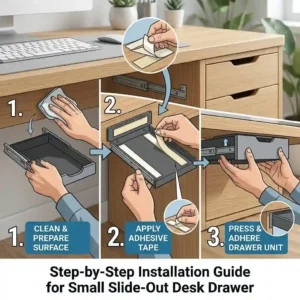
Amazon product pages give you a cartoon diagram with three steps. Here is the actual, professional way to install an under-mount small desk drawer to ensure it lasts for years.
Step 1: The Dry Run and Tape Method
Never start screwing or sticking immediately. Take blue painter’s tape and mark the exact footprint of the drawer under your desk. Sit in your chair, roll in, cross your legs, and physically simulate opening the imaginary drawer. Do your knees hit? Does it block your chair arms? Adjust the tape outline until the ergonomics are perfect.
Step 2: Surface Preparation (Crucial for Adhesives)
If using an adhesive model like the Elecife, wipe the desk underside with 90% isopropyl alcohol. Do not use household cleaners like Windex; they leave a microscopic slippery film designed to repel dust, which will also repel your adhesive. Let the alcohol flash off completely.
Step 3: The 24-Hour Cure Time
If you apply the adhesive and immediately load the drawer with 3 pounds of gear, it will fail within a week. The acrylic polymers in industrial tape need 24 to 48 hours to fully flow into the microscopic pores of your desk surface. Tape it up empty, and leave it alone for a full day.
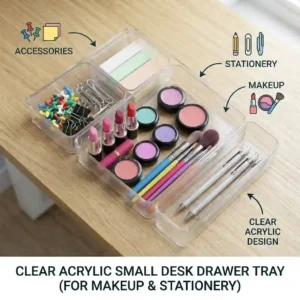
Real-World Scenarios: The WFH Pro, The Gamer, and The Student
How do these products match up to real human behavior? Here is my breakdown based on actual client profiles.
The Work-From-Home Professional: You need security and silence. You are dealing with company phones, hard drives, and you cannot have rattling plastic during Zoom calls.
-
The Match: The Penn Elcom model. Its lock secures sensitive IP, and the steel chassis deadens sound.
The PC Gamer: You have a massive mousepad, a heavy glass-top desk, and you need quick access to thumb drives, keycap pullers, and a microfiber cloth.
-
The Match: The Elecife adhesive drawer. You cannot drill into glass, and gamers rarely need to store heavy items. Mount it far to the left or right to avoid knee-strikes during intense mouse movements.
The College Student: You live in a dorm with pre-provided, cheap wooden furniture. You cannot damage the desk, but you desperately need to hide your snacks, highlighters, and cables.
-
The Match: The VIVO Clamp-on. It leaves zero marks on university property, installs in minutes without a drill, and holds up to aggressive daily use.
Problem → Solution Guide for Sagging and Sticking Drawers
Even high-quality storage can run into issues. Here is how to diagnose and fix the most common pain points I encounter in the field.
Problem: The drawer sags in the middle when pulled out.
-
Solution: This is a sign of weight overload or lateral slide failure. If you have an adhesive model, remove heavy items instantly. If it is a clamp-on model, check the torque on the C-clamps; if they are slightly loose, the track will bow. Re-tighten the clamps to ensure the track remains perfectly parallel.
Problem: Plastic drawers feel gritty and stick halfway.
-
Solution: Do not use WD-40. Standard WD-40 is a solvent, not a long-term lubricant, and it will actually melt cheap plastics. Instead, empty the drawer, wipe the tracks with a damp cloth to remove paper dust, and apply a thin layer of dry PTFE (Teflon) spray or simply rub a standard wax candle along the plastic runners. The wax fills the micro-abrasions and restores the glide instantly.
Problem: Adhesive keeps failing after a month.
-
Solution: Your desk material is likely low-surface-energy (LSE) plastic or heavily textured wood. Standard 3M tape struggles here. You need to upgrade the adhesive tape to a specific LSE formulation, or switch to a clamp-on model.

Long-Term Cost & Maintenance: The Year-One Roadmap
What happens to a small desk drawer after 12 months of daily, 8-hour-a-day usage? Let’s calculate the total cost of ownership and the required maintenance cycle.
Months 1-3: Everything feels great. The honeymoon phase. However, if you bought a cheap $10 unbranded drawer, this is when the track stops will snap off from repeated forceful closures.
Months 4-6: Dust accumulation begins to affect performance. For models like the SimpleHouseware mesh organizer, a quick blast with canned air is all you need. For enclosed under-desk units, paper dust and hair will begin to wrap around ball-bearing slides. You must take a Q-tip with rubbing alcohol and clean the tracks to prevent kinetic binding.
Months 7-12: The true test of structural integrity. Screws anchored in particleboard may begin to slightly loosen due to the repeated micro-vibrations of opening and closing. I advise my clients to do a “Year One Torque Check”—take a screwdriver and give every mounting screw a quarter-turn to snug them back up. If you invest $40-60 in a premium model and perform this 5-minute annual maintenance, your cost-per-use drops to fractions of a penny, making it an incredibly high-ROI ergonomic investment.
Space Optimization: What to Expect in Real-World Performance
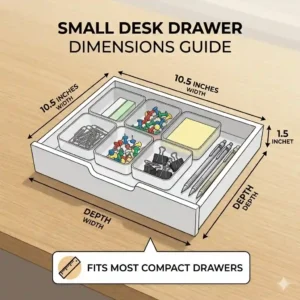
Do not expect a small desk drawer to hold standard 8.5″ x 11″ printer paper unless explicitly stated in the dimensions. The real-world performance of these “small” units is about micro-organization.
By moving your phone, charging cables, AirPods, and pens completely off the visual plane of your desk, you reduce cognitive load. According to environmental psychology studies (which you can explore via resources at Cornell University’s Ergonomics Web), visual clutter directly correlates with increased cortisol levels and reduced focus. By utilizing a slim, under-mount drawer, you effectively create a “clean room” environment on your desktop. Your keyboard, your mouse, and your monitor are the only things left. The psychological shift from a cluttered mess to a streamlined surface is immediate and profound.
Safety, Weight Limits, and Desk Integrity
I must touch on a critical safety aspect that many consumers ignore: the structural integrity of motorized standing desks.
If you own a dual-motor standing desk, adding a heavy steel drawer like the Penn Elcom loaded with electronics to the extreme left or right side creates an asymmetric load. Over time, lifting an unbalanced desk can burn out one of the motors prematurely or cause the lifting columns to bind. To prevent this, always install heavy drawers as close to the center-line of the desk as comfortably possible, or counterbalance the opposite side with your PC tower or heavy UPS battery backup.
Furthermore, never use a small desk drawer to support your body weight. I have seen clients lean on open drawers when standing up from their chairs. Even commercial steel tracks will warp under 50 pounds of sudden human body weight. Treat the drawer as a storage vessel, not a structural grab-bar.
✨ Don’t Miss These Exclusive Deals!
🔍 Ready to build your ultimate productivity station? Click any highlighted product to verify current availability. Organize smarter, not harder!
Final Thoughts on Workspace Optimization
Upgrading your workspace with a small desk drawer isn’t just about hiding a few pens; it is a strategic move to reclaim your focus, protect your expensive tech, and optimize your ergonomic footprint. Whether you choose the bank-vault security of the Penn Elcom, the renter-friendly adaptability of the VIVO clamp-on, or the minimalist invisibility of the Elecife adhesive tray, the key is matching the mounting mechanism to your specific desk material and workflow needs.
Stop letting clutter dictate your productivity. Take 15 minutes this weekend, assess your knee clearance, evaluate your desk material, and invest in a storage solution that actually works for you, not against you.
FAQs
❓ What is the best way to attach a small desk drawer without drilling?
✅ The most reliable non-drilling method is using a C-clamp mounting system. Clamp-on drawers provide high weight capacity (up to 15 lbs) without damaging the desk surface, far outperforming standard adhesive strips which degrade over time…
❓ Can you install an under desk drawer on a standing desk?
✅ Yes, but you must measure carefully. Ensure the drawer’s depth doesn’t interfere with the standing desk’s central metal crossbar or motor housing. Clamp-on or shallow adhesive models usually work best for standing desk frames…
❓ How much weight can a typical small desk drawer hold?
✅ Adhesive plastic models safely hold 3-5 pounds. Clamp-on metal/plastic hybrids handle 10-15 pounds. Heavy-duty screw-mounted steel drawers can support upwards of 20-25 pounds, provided your desk is made of solid wood…
❓ Why does my plastic desk drawer stick when sliding?
✅ Sticking is caused by kinetic friction from micro-abrasions in the plastic tracks, often worsened by dust buildup. Clean the tracks with a damp cloth and apply dry PTFE spray or rub candle wax along the runners to restore the glide…
❓ Are adhesive under desk drawers worth it?
✅ They are excellent for lightweight items like pens and cables, especially on glass desks where drilling or clamping isn’t possible. However, they fail quickly if overloaded or installed on porous, uncleaned surfaces…
Recommended for You
- 7 Best Deep Drawer Organizer Office Solutions for 2026: Organize Now!
- 5 Best small catch all tray Options for 2026: Stylish Picks to Organize Your Chaos Fast
- 5 Best pen tray Ideas for Maximum Desk Organization & Productivity
Disclaimer: This article contains affiliate links. As an Amazon Associate, I earn from qualifying purchases. If you purchase products through these links, we may earn a small commission at no additional cost to you.
✨ Found this helpful? Share it with your friends! 💬🤗
[addtoany]
